Lý Thuyết Cốt Lõi
1. Dịch Vụ Compute — Khi Nào Dùng Cái Nào?
| Dịch vụ | Loại | Quản lý OS? | Khi nào dùng |
|---|---|---|---|
| Azure Virtual Machines | IaaS | Bạn quản lý | Lift-and-shift, cần control hoàn toàn, app đặc thù OS |
| VM Scale Sets | IaaS | Bạn quản lý | Auto-scale nhóm VM giống hệt nhau, web tier, batch processing |
| Azure App Service | PaaS | Microsoft | Web app, REST API, mobile backend. .NET, Node.js, Python, Java, PHP |
| Azure Functions | Serverless | Microsoft | Event-driven, micro-task, HTTP triggers, timer, Queue. Trả tiền theo execution |
| Container Instances (ACI) | Container | Microsoft | Container đơn lẻ, task ngắn hạn, test nhanh, không cần orchestration |
| Azure Kubernetes Service | Container | Bán quản lý | Microservices phức tạp, production Kubernetes, cần orchestration đầy đủ |
Quy tắc chọn Compute service:
Cần control hoàn toàn OS / app đặc thù license? → VM
Web app / API, không muốn lo OS? → App Service
Event-driven, chạy function ngắn, pay-per-execution? → Azure Functions
Đã container hóa, cần orchestration phức tạp? → AKS
Container đơn giản, test nhanh? → ACI
2. Azure Networking
Mạng riêng tư trên Azure. Isolated hoàn toàn. Gồm nhiều Subnet (phân đoạn logic). VNet có address space ví dụ 10.0.0.0/16. Subnet: 10.0.1.0/24. Hỗ trợ VNet Peering kết nối hai VNet với nhau.
Firewall ở tầng subnet hoặc NIC. Gồm Inbound và Outbound rules. Mỗi rule: Priority (100–4096, thấp = ưu tiên cao), Source, Destination, Port, Protocol, Action (Allow/Deny). Default: deny all inbound, allow all outbound.
Phân phối traffic Layer 4 (TCP/UDP) đến nhiều VM. Hỗ trợ Public (Internet-facing) và Internal (nội bộ). Dùng cùng VM Scale Sets để auto-scale. Kiểm tra health probe định kỳ, loại VM bị lỗi.
VPN Gateway: Kết nối on-premises ↔ Azure qua Internet (mã hóa IPSec). Băng thông đến 10 Gbps. ExpressRoute: Kết nối riêng tư qua đường vật lý (không qua Internet). Băng thông đến 100 Gbps, latency thấp, SLA cao hơn.
Dịch vụ DNS hosting trên Azure. Hỗ trợ cả public zone (domain Internet) và private zone (tên nội bộ trong VNet). SLA 100%. Tích hợp với Azure RBAC để quản lý quyền truy cập DNS zone.
Public IP: Địa chỉ IP công khai gán cho VM/LB. Dynamic hoặc Static. Azure Bastion: Thay thế expose RDP/SSH ra Internet. Kết nối VM qua browser (HTTPS/443) từ Portal, không cần Public IP trên VM.
3. Azure AI Services & Responsible AI
- Azure AI services (trước: Cognitive Services): Bộ API sẵn dùng gồm Vision, Speech, Language, Translator, Document Intelligence — tích hợp AI vào app không cần ML expertise.
- Azure OpenAI Service: Truy cập model GPT-4o, GPT-4, DALL-E, Whisper qua API bảo mật cấp doanh nghiệp. Dữ liệu không dùng để train lại model.
- Azure AI Foundry: Nền tảng thống nhất để build, deploy, quản lý giải pháp AI/ML end-to-end — model catalog, prompt flow, evaluation, monitoring.
- Microsoft Copilot: AI assistant nhúng trong M365, GitHub, Azure Portal — tăng năng suất qua ngôn ngữ tự nhiên.
- 1
Fairness (Công bằng): AI không được phân biệt đối xử dựa trên giới tính, chủng tộc, v.v.
- 2
Reliability & Safety (Tin cậy & An toàn): Hoạt động đúng, nhất quán, an toàn trong mọi tình huống.
- 3
Privacy & Security (Riêng tư & Bảo mật): Bảo vệ dữ liệu người dùng, tuân thủ quy định.
- 4
Inclusiveness (Toàn diện): Phục vụ mọi người, kể cả người có khuyết tật.
- 5
Transparency (Minh bạch): Người dùng hiểu AI hoạt động thế nào, có thể kiểm chứng.
- 6
Accountability (Trách nhiệm): Con người chịu trách nhiệm về quyết định của AI, có cơ chế giám sát.
Bài Tập Thực Hành (Lab)
Tạo Resource Group và VNet
# Tạo resource group
									az group create \
									  --name rg-az900-lab04 \
									  --location southeastasia

									# Tạo Virtual Network với 2 subnet
									az network vnet create \
									  --name vnet-lab04 \
									  --resource-group rg-az900-lab04 \
									  --location southeastasia \
									  --address-prefixes 10.0.0.0/16 \
									  --subnet-name subnet-web \
									  --subnet-prefixes 10.0.1.0/24

									# Thêm subnet thứ hai cho tier backend
									az network vnet subnet create \
									  --name subnet-backend \
									  --vnet-name vnet-lab04 \
									  --resource-group rg-az900-lab04 \
									  --address-prefixes 10.0.2.0/24
Tạo Linux VM nhỏ nhất (B1s — free tier eligible)
# Tạo VM Ubuntu 22.04 LTS, size B1s (1vCPU, 1GB RAM)
									az vm create \
									  --name vm-web-01 \
									  --resource-group rg-az900-lab04 \
									  --location southeastasia \
									  --image Ubuntu2204 \
									  --size Standard_B1s \
									  --vnet-name vnet-lab04 \
									  --subnet subnet-web \
									  --admin-username azureuser \
									  --generate-ssh-keys \
									  --public-ip-sku Standard \
									  --tags Environment=Learning Course=AZ-900
--public-ip-sku Standard). Lệnh az vm create mặc định sẽ tạo Standard SKU nếu chỉ định flag này — đảm bảo luôn khai báo tường minh.Quá trình tạo VM mất khoảng 2–3 phút. Azure tự động tạo NIC, Public IP, NSG đi kèm.
Xem thông tin cấu hình mạng VM
# Xem thông tin VM (IP public, IP private, trạng thái)
								az vm show \
								  --name vm-web-01 \
								  --resource-group rg-az900-lab04 \
								  --show-details \
								  --query "{Name:name,PublicIP:publicIps,PrivateIP:privateIps,PowerState:powerState}" \
								  --output json

								# Xem NSG rules được tạo tự động
								az network nsg list \
								  --resource-group rg-az900-lab04 \
								  --output table

								# Xem VNet và subnet
								az network vnet show \
								  --name vnet-lab04 \
								  --resource-group rg-az900-lab04 \
								  --query "{Name:name,AddressSpace:addressSpace,Subnets:subnets[].{Name:name,Prefix:addressPrefix}}" \
--output jsonHình ảnh và Video thực hành Labs.
Hình ảnh chi tiết thực hành lab theo nội dung bên trên.

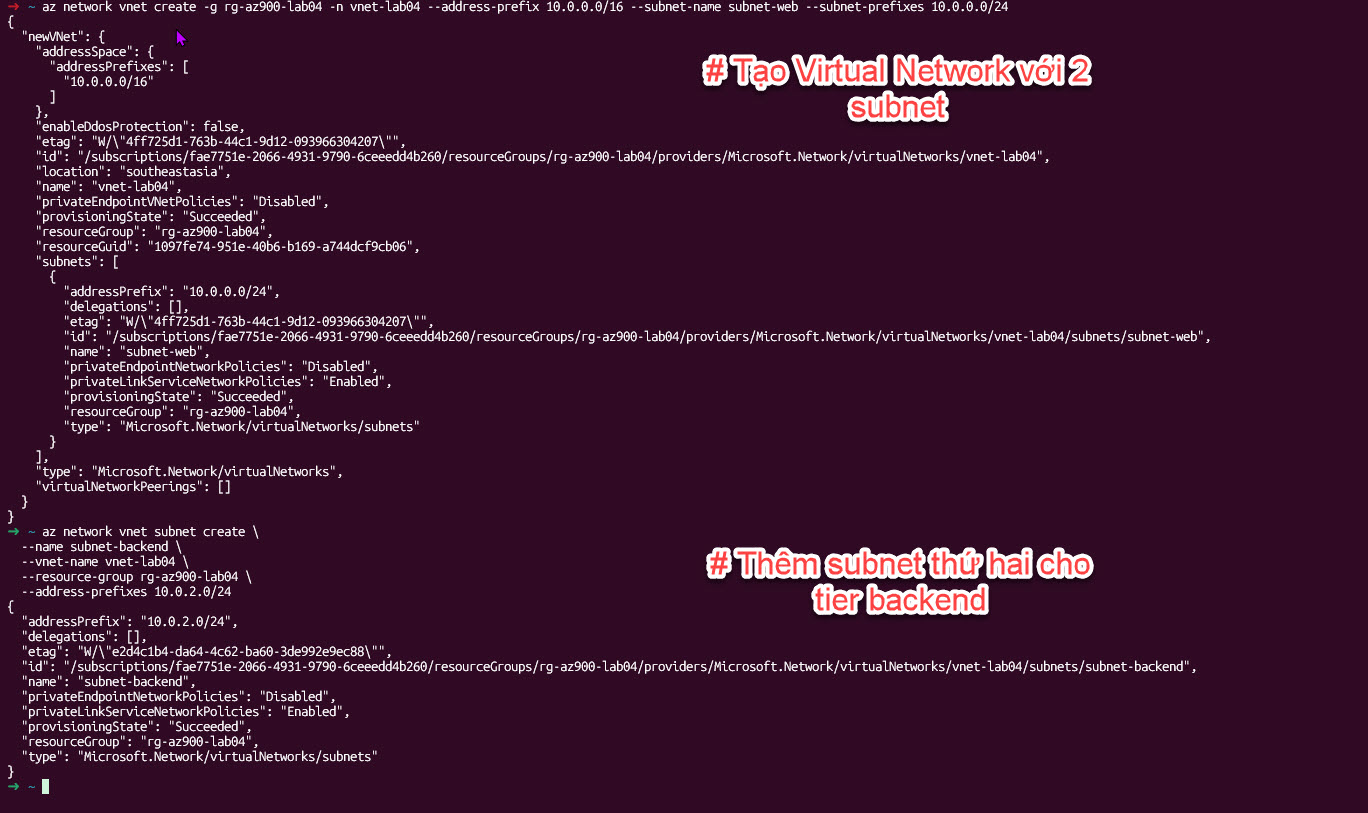
Ảnh minh họa: Tạo Resource Group và VNet.
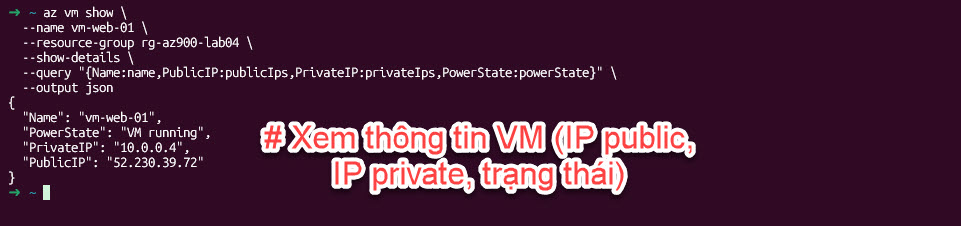
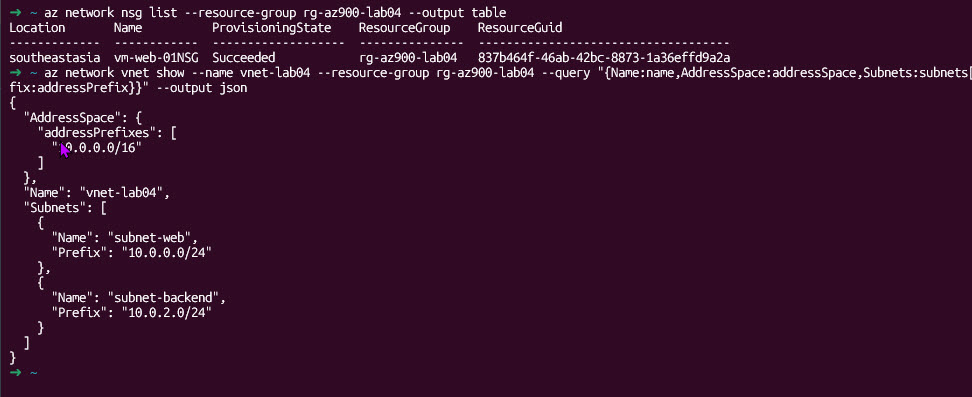
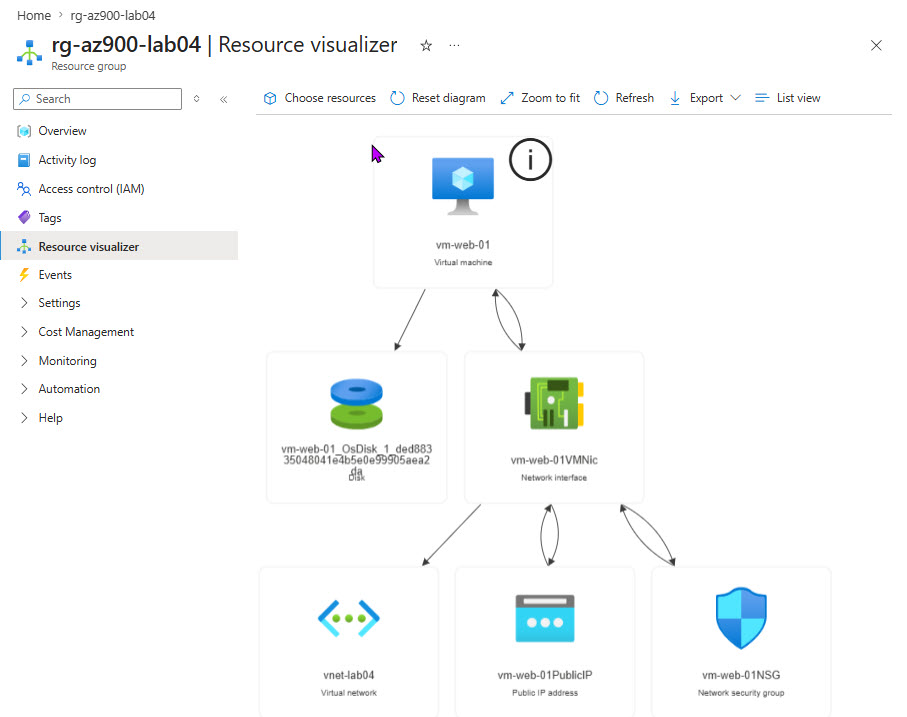
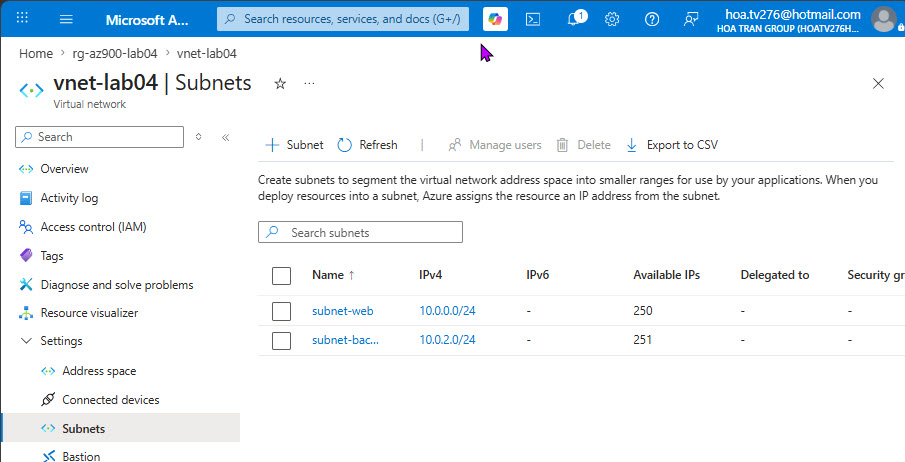
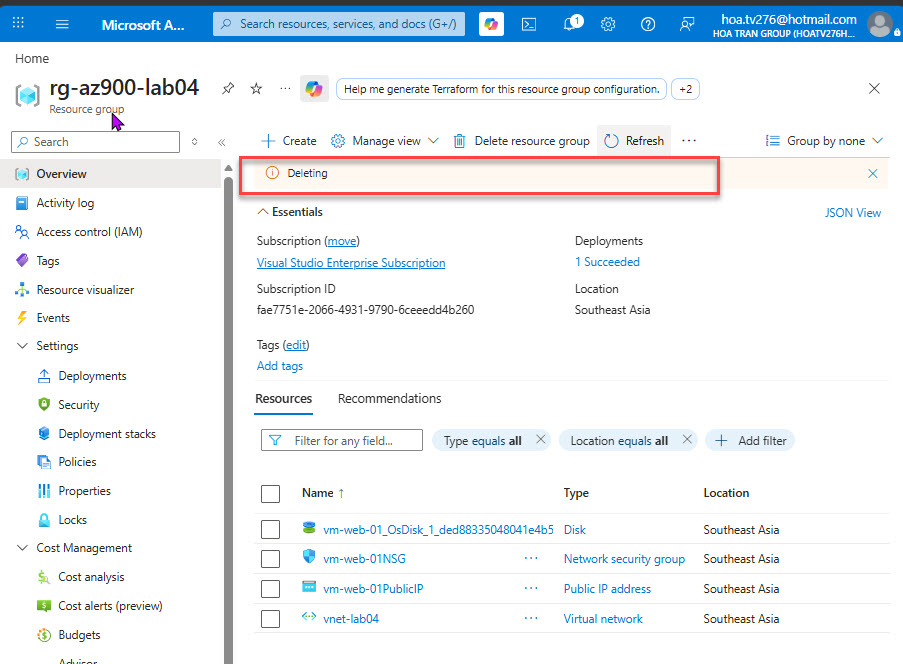
Ảnh minh họa:Xem thông tin cấu hình mạng VM
Cleanup — Xóa toàn bộ lab (quan trọng: VM tính tiền theo giờ)
# Xóa resource group sẽ xóa VM, VNet, NSG, Public IP, NIC
							az group delete \
							  --name rg-az900-lab04 \
							  --yes \
							  --no-wait

							echo "Cleanup initiated. Resources will be deleted within 5 minutes."
Kết Quả Đầu Ra
Output: az vm create (tóm tắt)
{
  "fqdns": "",
  "id": "/subscriptions/<sub-id>/resourceGroups/rg-az900-lab04/providers/Microsoft.Compute/virtualMachines/vm-web-01",
  "location": "southeastasia",
  "macAddress": "00-22-48-xx-xx-xx",
  "powerState": "VM running",
  "privateIpAddress": "10.0.1.4",
  "publicIpAddress": "20.198.xxx.xxx",
  "resourceGroup": "rg-az900-lab04",
  "zones": ""
}
Output: VNet với 2 Subnet
{
  "Name": "vnet-lab04",
  "AddressSpace": {"addressPrefixes": ["10.0.0.0/16"]},
  "Subnets": [
    {"Name": "subnet-web",     "Prefix": "10.0.1.0/24"},
    {"Name": "subnet-backend", "Prefix": "10.0.2.0/24"}
  ]
}
Verify trên Portal: Resource groups → rg-az900-lab04 → vm-web-01 → Networking tab: xem NIC, Public IP, NSG rules. Virtual Networks → vnet-lab04 → Subnets: xem 2 subnet và address range.
Ứng Dụng Thực Tế
Web app 3-tier trên Azure
Website bán hàng cần frontend, API backend, database. Traffic tăng mạnh dịp sale 11/11.
Frontend: App Service + CDN. API: VM Scale Sets + Load Balancer. DB: Azure SQL. VNet phân tách subnet Web/API/DB với NSG.
Auto-scale từ 2 lên 20 VM Scale Set instances trong 5 phút. Không downtime. Chi phí giảm 70% ngoài giờ cao điểm.
Kết nối hybrid qua VPN Gateway
Nhân viên VN cần truy cập hệ thống ERP trên Azure VNet từ văn phòng Hà Nội và TP.HCM.
VPN Gateway site-to-site kết nối từng văn phòng vào Azure VNet. NSG chỉ cho phép traffic từ IP range văn phòng.
Kết nối an toàn mã hóa IPSec. Không expose ERP ra Internet. Latency <30ms Singapore từ văn phòng VN.