Lý Thuyết Cốt Lõi
1. Storage Account — Namespace Thống Nhất
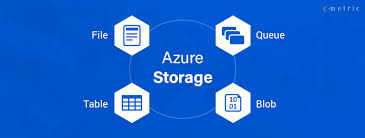
Storage Account là container cấp cao nhất, cung cấp namespace duy nhất cho tất cả dịch vụ storage. Mỗi storage account có tên unique toàn cầu (3-24 ký tự, chỉ lowercase + số).
Files, images, videos, backups. Object storage không có cấu trúc.
File share qua SMB/NFS. Mount như ổ đĩa mạng trên Windows/Linux.
Message queue giữa các thành phần app. Tối đa 64KB/message.
NoSQL key-value store. Schema-less. Giá rẻ hơn CosmosDB.
2. Blob Access Tiers — So Sánh Chi Phí
| Tier | Giá lưu trữ /GB/tháng | Giá đọc | Thời gian truy cập | Khi nào dùng |
|---|---|---|---|---|
| Hot | $0.018 | Thấp nhất | Tức thì (ms) | Data truy cập thường xuyên: website assets, active backups |
| Cool | $0.010 | Cao hơn Hot | Tức thì (ms) | Ít truy cập (30+ ngày): short-term backup, older media |
| Cold | $0.004 | Cao hơn Cool | Tức thì (ms) | Rất ít truy cập (90+ ngày): compliance data, older backups |
| Archive | $0.00099 | Rất cao (rehydration fee) | 1–15 giờ (rehydration) | Hiếm truy cập (180+ ngày): regulatory, legal archive |
Lưu ý quan trọng: Archive tier không hỗ trợ đọc trực tiếp. Phải rehydrate (chuyển về Hot/Cool) trước khi đọc — mất 1–15 giờ tùy priority (Standard/High). Chi phí rehydration = $0.022/GB.
3. Replication — Độ Bền & Phạm Vi Bảo Vệ
| Loại | Bản sao | Phạm vi | Độ bền | Bảo vệ khỏi | Chi phí |
|---|---|---|---|---|---|
| LRS | 3 bản / 1 datacenter | 1 datacenter | 11 nines | Disk/server failure | Thấp nhất |
| ZRS | 3 bản / 3 AZ | 1 region, 3 AZ | 12 nines | Datacenter failure | Vừa |
| GRS | 6 bản (3+3) | 2 region (pair) | 16 nines | Region outage | Cao |
| GZRS | 6 bản (3 AZ+3) | 2 region, 3 AZ primary | 16 nines | AZ + Region outage | Cao nhất |
| RA-GRS | GRS + read secondary | 2 region | 16 nines | Region outage + read from DR | Cao++ |
4. SAS Token, Azure Files & Lifecycle Management
Token cho phép truy cập có giới hạn vào storage mà không cần share account key. Cấu hình: permissions (read/write/delete), expiry time, allowed IP, HTTPS only. 3 loại: Account SAS, Service SAS, User Delegation SAS.
File share cloud qua SMB 3.0 (Windows) hoặc NFS 4.1 (Linux). Mount như Z:\ trên Windows. Persistent storage cho Azure VM. Thay thế on-premises file server. Tích hợp Azure File Sync để sync on-prem.
Policy tự động di chuyển blob giữa các tier theo tuổi. Ví dụ: Hot → Cool sau 30 ngày, Cool → Archive sau 90 ngày, xóa sau 365 ngày. Tiết kiệm chi phí tự động mà không cần code.
Bài Tập Thực Hành (Lab)
Video YouTube
Video YouTube: .
Mở video YouTubeTạo Storage Account Standard GRS Hot tier
# Tạo resource group
# Chọn subscription nếu cần
# az account set --subscription "YOUR_SUBSCRIPTION_ID"

# Biến dùng chung
RG_NAME="rg-az900-lab05"
LOCATION="southeastasia"
STORAGE_NAME="sthoatranlab$RANDOM$RANDOM"
STORAGE_NAME=$(echo "$STORAGE_NAME" | tr '[:upper:]' '[:lower:]' | cut -c1-24)

echo "Storage Account Name: $STORAGE_NAME"

# Tạo resource group
az group create \
  --name "$RG_NAME" \
  --location "$LOCATION"

# Tạo storage account -Tên của storages là duy nhất trên Az không được giống.
# Lưu ý: bật --allow-blob-public-access true nếu muốn container public
az storage account create \
  --name "$STORAGE_NAME" \
  --resource-group "$RG_NAME" \
  --location "$LOCATION" \
  --sku Standard_GRS \
  --kind StorageV2 \
  --access-tier Hot \
  --https-only true \
  --min-tls-version TLS1_2 \
  --allow-blob-public-access true \
--tags Environment=Learning Course=AZ-900--min-tls-version TLS1_2 là bắt buộc — Storage Account cấu hình TLS 1.0 hoặc 1.1 sẽ bị từ chối kết nối. Luôn thêm flag này khi tạo storage account qua CLI.Tạo Blob container và upload file
# Lấy connection string
# Lấy connection string
CONN=$(az storage account show-connection-string \
  --name "$STORAGE_NAME" \
  --resource-group "$RG_NAME" \
  --query connectionString \
  -o tsv)

# Tạo container public mức blob
az storage container create \
  --name assets \
  --public-access blob \
  --connection-string "$CONN"

# Tạo file test
echo "Hello from HoaTranLab AZ-900" > test.txt

# Upload file
az storage blob upload \
  --container-name assets \
  --name test.txt \
  --file test.txt \
  --connection-string "$CONN" \
  --overwrite true

# Xem URL blob
BLOB_URL=$(az storage blob url \
  --container-name assets \
  --name test.txt \
  --connection-string "$CONN" \
  -o tsv)

echo "$BLOB_URL"Tạo SAS Token có thời hạn 24 giờ
# Tạo SAS token read-only cho blob, hết hạn sau 24h
# Tạo thời hạn hết hạn sau 24 giờ
END_DATE=$(date -u -d "24 hours" '+%Y-%m-%dT%H:%MZ' 2>/dev/null || date -u -v+24H '+%Y-%m-%dT%H:%MZ')

# Tạo SAS token read-only
SAS_TOKEN=$(az storage blob generate-sas \
  --container-name assets \
  --name test.txt \
  --permissions r \
  --expiry "$END_DATE" \
  --https-only \
  --connection-string "$CONN" \
  -o tsv)

echo "SAS Token:"
echo "$SAS_TOKEN"

echo "Full SAS URL:"
echo "${BLOB_URL}?${SAS_TOKEN}"
Output là SAS token. Append vào URL blob để truy cập file private.
Tạo Lifecycle Management Policy
Tạo file lifecycle-policy.json:
cat > lifecycle-policy.json << 'EOF'
{
  "rules": [
    {
      "name": "tiering-rule",
      "enabled": true,
      "type": "Lifecycle",
      "definition": {
        "filters": {
          "blobTypes": ["blockBlob"]
        },
        "actions": {
          "baseBlob": {
            "tierToCool": {
              "daysAfterModificationGreaterThan": 30
            },
            "tierToArchive": {
              "daysAfterModificationGreaterThan": 90
            },
            "delete": {
              "daysAfterModificationGreaterThan": 365
            }
          }
        }
      }
    }
  ]
}
EOF
# Áp dụng policy
az storage account management-policy create \
  --account-name "$STORAGE_NAME" \
  --resource-group "$RG_NAME" \
--policy @lifecycle-policy.jsonTạo Azure File Share
# Tạo file share 10GB
az storage share create \
  --name fileshare-lab05 \
  --quota 10 \
  --connection-string "$CONN"

az storage share list \
  --connection-string "$CONN" \
  --output table
Cleanup
az group delete --name rg-az900-lab05 --yes --no-waitKết Quả Đầu Ra
Output: Storage Account đã tạo
{
  "id": "/subscriptions/<sub-id>/resourceGroups/rg-az900-lab05/providers/Microsoft.Storage/storageAccounts/sthoatranlab123456",
  "kind": "StorageV2",
  "location": "southeastasia",
  "name": "sthoatranlab123456",
  "primaryEndpoints": {
    "blob": "https://sthoatranlab123456.blob.core.windows.net/",
    "file": "https://sthoatranlab123456.file.core.windows.net/",
    "queue": "https://sthoatranlab123456.queue.core.windows.net/",
    "table": "https://sthoatranlab123456.table.core.windows.net/"
  },
  "sku": {"name": "Standard_GRS", "tier": "Standard"},
  "statusOfPrimary": "available",
  "statusOfSecondary": "available"
}
So sánh chi phí tier — 500TB media archive
| Tier | 500TB/tháng | Tiết kiệm so Hot |
|---|---|---|
| Hot | $9,216 | Baseline |
| Cool | $5,120 | Tiết kiệm $4,096/tháng |
| Archive | $507 | Tiết kiệm $8,709/tháng (94%) |
Verify trên Portal: Storage accounts → sthoatranlab... → Containers → assets → test.txt → xem Properties (URL, tier, size). Lifecycle management → Data management → Lifecycle management.
Ứng Dụng Thực Tế
Lưu trữ 500TB video archive tiết kiệm $8,700/tháng
500TB video nội dung cũ (>1 năm) lưu trên Hot tier. Chi phí storage $9,216/tháng. Nội dung rất hiếm khi truy cập.
Lifecycle policy: Hot (0–30 ngày) → Cool (30–90 ngày) → Archive (90+ ngày). Tự động chuyển không cần code.
Chi phí giảm từ $9,216 → $507/tháng. Tiết kiệm $105,708/năm. Zero effort — policy tự chạy hàng đêm.
Thay file server nội bộ bằng Azure Files
File server NAS on-premises hết vòng đời, cần thay. 200 nhân viên làm việc hybrid (văn phòng + remote).
Azure Files Premium 2TB, mount SMB trên Windows. Azure File Sync cache on-prem cho branch office. MFA + RBAC kiểm soát quyền truy cập.
Không cần mua NAS (~150 triệu). Remote worker truy cập từ bất kỳ đâu. Backup tự động với geo-replication.
Blob Storage làm CDN cho product images
5 triệu ảnh sản phẩm. Page load chậm do server xử lý static files. Tốn băng thông server.
Blob Hot + Azure CDN (Front Door). Static assets qua CDN PoP Hà Nội/TP.HCM. SAS token cho ảnh private.
Latency ảnh <5ms (từ CDN PoP local). Server giải phóng hoàn toàn khỏi static files. Scale không giới hạn.